If you own Jabra Elite 65t wireless earbuds, you may eventually run into one or more frustrating issues. Many users report common problems with Jabra Elite 65t such as fast battery drain, one earbud cutting out, pairing trouble, or the buds refusing to turn on. In this article we’ll cover each issue from an expert technician’s perspective. We explain simple user-level fixes and then dive into the internal hardware causes.
Important Notes:
If you start facing issues with your earbuds soon after buying them, it’s best not to ignore them. Early problems like charging issues, connection drops, or one earbud not working are often signs of a manufacturing defect. In such cases, you should take advantage of the two-years warranty or reach out to the seller for a replacement or support. Acting early can save you from dealing with bigger problems later.
When it comes to long-term use, the Jabra Elite 65t is built for everyday listening, but like any electronic device, it won’t perform the same forever. Most users experience stable sound quality and decent battery life for about a year or more with regular use. However, after extended use, especially beyond 16 to 21 months, you may begin to notice issues like faster battery drain, weaker call or microphone performance, or occasional connectivity problems. At that point, considering a replacement becomes a practical choice if you want to maintain a smooth and reliable audio experience.
Battery and Charging Problems (Drain, Charging Issues)
If the earbuds or case die quickly or refuse to charge, start with basic troubleshooting. Fully charge both the case and earbuds. Plug the case into a proper 5V/1A USB charger and let it charge for 2-3 hours. Then place the buds inside and wait for each earbud’s LED to blink red (indicating they are charging). Leave them in the case until the case’s LED indicates a full charge. Sometimes a hard reset is needed: remove the buds and, as Jabra support advises, hold the multifunction button on the right earbud for 10 seconds to reset the pair.
Update the firmware via the Jabra Sound+ app or even “reload” it by toggling the language settings (a known trick). Also check for dirt on the USB-C port or the gold charging contacts, clean them gently with isopropyl alcohol if dirty. These steps often restore normal charging. If the problem is simply aging batteries, Jabra support sadly notes that lithium cells degrade over time (they’re not user-replaceable).
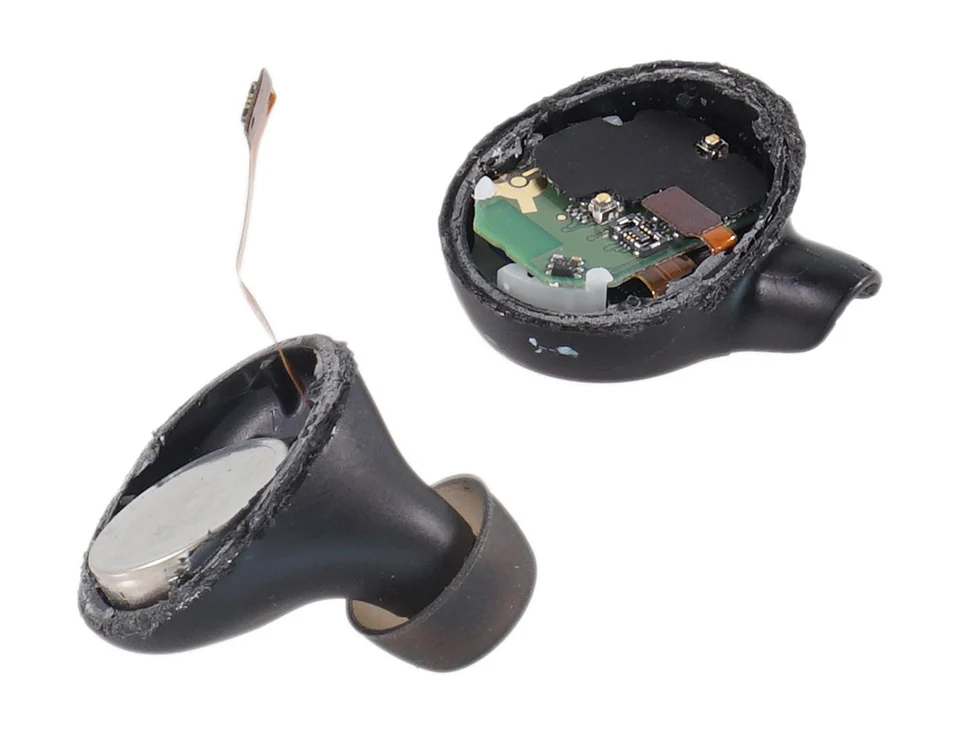
Internally, each Elite 65t earbud contains a small coin-cell Li‑ion battery (~85-90 mAh), and the charging circuit is built around a TI BQ24040 charger IC. A trained technician would open the plastic earbud housing to inspect these parts. For example, the teardown shows an 8-bit STM8L MCU and the TI BQ24040 power-management chip on the earbud’s PCB, and a gold-plated 6 mm speaker. If an earbud won’t hold charge, the battery cell itself may be worn out.
A technician could carefully pry open the casing and test the Li-ion cell’s voltage. If the battery is dead, it could be replaced with a matching 3.7V ~90 mAh cell (though you must avoid puncturing it). The technician would also check the case’s internal board: the case uses a larger 3.8V 450 mAh Li‑Po pack and a TI BQ24232 power-path charger, as well as an ABLIC Hall-effect sensor to detect the lid. A faulty BQ24232 chip or loose pogo pin can cause charging failures. In severe cases, replacing the case’s battery or charging IC might be possible, but it requires micro-soldering. (If you’re not comfortable opening your earbuds, seek professional help or buy a new jabra elite case)
Connectivity and Pairing Issues
Another frequent complaint is that the 65t won’t pair or loses connection. First try the easy fixes: make sure Bluetooth is on, the buds are fully charged, and you’ve “forgotten” the 65t in your phone’s BT list and re-paired. Reset the earbuds as described above and then hold the right bud’s multi-function button for 5-10 seconds until the LED flashes blue, this enters pairing mode.
Also try the Jabra Sound+ app, which has guided setup steps. Disabling multi-point (pairing two devices) or toggling one-earbud-only mode might help as well. In many cases, a factory reset is the cure: as Jabra’s support rep explains, perform the reset (hold the right bud’s button for ~10 s) to clear all pairing data, then pair again from scratch.
On the hardware side, the Elite 65t uses a dual-radio system: a Qualcomm CSR8670 Bluetooth SoC and an NXP NxH2281A1 NFMI (near-field magnetic induction) chip for ear-to-ear syncing. Poor earbud connectivity often stems from software issues or tiny antenna problems. A technician would check if the NFMI antenna (a small ferrite coil on the PCB) is intact. They might also examine the flex connector between the earbud housing and the PCB (a common failure point if the bud was dropped).
The PCB itself (pictured) holds the Bluetooth transceiver and MCU, so one could verify its voltage rails. If Bluetooth pairing is flaky, updating the firmware can help, note that Jabra’s release notes mention fixes for interrupted updates and volume imbalances. Rarely, the Bluetooth chip or oscillator may be bad, which a tech could replace on the board. In practice, most pairing issues are solved by the reset/firmware steps above rather than internal repair.
Earbuds Not Turning On:
If one or both earbuds refuse to power on at all (no LEDs, no sound), start with a deep charge and reset. Plug in the charging case for several hours and ensure the LED lights come on. Then remove the buds and perform the reset: hold the right bud’s multi-function button for about 10 seconds until you see a purple flash. This often revives “bricked” buds by reloading the firmware.
If they still won’t turn on, double-check the charging contacts. Inspect the small gold pads on the buds and the pogo pins in the case (clean any debris). Try charging the buds individually (sometimes one bud’s magnet misaligns the sensor). If all else fails, the issue may be a dead battery or internal power IC.
From a technical view, the earbud’s internal power circuitry can be at fault. The TI BQ24040 charger IC handles both charging and battery regulation. If this chip fails, the earbud will never power up even if the cell has juice. A technician might open the case and test for voltage on the battery pins. In the charging case itself, a Hall-effect sensor and ST STM32 MCU control power to the buds. A broken Hall sensor or connector could cause the case to stop supplying power.
The case also contains a TI BQ24232 charger with power-path management, if this IC is damaged, the case won’t charge its own battery or the buds. Diagnosing these issues requires a multimeter and knowledge of the board layout (shown in teardown images). Often the fix is to replace the defective IC or cable; otherwise you may need to send the case for repair.
One Earbud (Left or Right) Not Working:
A very common problem is when one side goes silent or cuts out. If this happens, first clean the earbuds and case thoroughly. Earwax or moisture can disable the tiny proximity/contact switch inside the earbud. In fact, many users report that dirt in the earbud’s little reset hole can stop it from working. Using a toothpick or cotton swab to gently clean the pinhole vent on the inner ear tip often restores function (this hole is near the ear tip on the interior surface).
Also reset the pair (hold right bud button 10s), and try using just the one bud in mono mode. If the left bud is dead but the right works (or vice versa), remove the dead bud from the case and hold its button for 10 seconds to turn it off/on again. Sometimes toggling the mono-ear mode in Sound+ can fix sync issues. Make sure the buds are on the same firmware and that multi-point isn’t confusing them.
Technically, one-sided failures usually mean a hardware fault in that earbud. The teardown shows that each bud has its own speaker, battery, and PCB components. The speaker itself is a 6 mm dynamic driver soldered with two fine wires. A broken speaker wire or coil would kill that bud.
A tech would open the bud, expose the speaker and check continuity. The internal PCB also contains small microphone and audio amplifiers. If the right earbud’s volume is very low, it could be a partial failure of its amp (part of the Qualcomm chip) or a loose audio trace. There’s also a tiny proximity/motion sensor (the little hole mentioned above) tied to the MCU; if that switch is stuck, the bud might cut out thinking it’s out of your ear. Inspecting the PCB under magnification can reveal cracked solder joints or corrosion. In many cases, replacing the entire driver unit or board inside that earbud is the only cure, which generally requires specialized repair.
If one earbud still isn’t working after cleaning and resetting, consider firmware fixes: note that a 2018 firmware update “solved distorted audio in the left earbud” and “un-balanced audio between left and right”. So ensure you’ve updated to the latest version. If problems persist, you may need professional service (see links below).
Low Volume in Right Earbud:
Some users report that the right earbud plays noticeably quieter than the left. First rule out obvious causes: check your phone’s audio balance setting (some phones let you shift balance toward one ear). If your balance slider is centered, make sure the ear tips fit snugly (a poor seal can make one side sound quieter).
Also verify that the buds are not in HearThrough mode (which is quiet by design unless external sound is loud). Reset the buds and re-pair, sometimes the audio channel can get corrupted and the reset fixes it. In the Jabra Sound+ app, check if any equalizer or volume leveling is enabled (and disable it). Try playing music on another device to see if the problem follows the buds or the source. If it’s only the right bud, and everything else seems normal, you may have found a hardware issue.
Internally, the 65t does not have a separate digital-to-analog chip for each bud – the Qualcomm CSR8670 on each side handles its own audio. The teardown confirms there’s a dedicated amplifier and filter for each driver. A technician diagnosing low volume would check the speaker itself (a weak driver can result from mechanical damage) and the solder joints on the PCB.
If the internal amplifier inside the SoC has failed on that channel, one could try reflashing firmware or replacing the earbud entirely. Because firmware update notes mention volume improvements (“improved call audio volume”), updating the buds is worth a try. However, beyond that, a tech-level fix might involve measuring the audio output pins on the chip or substituting the driver, which is usually only practical for a repair shop.
HearThrough / ANC Problems:
The Elite 65t doesn’t have true Active Noise Cancellation, instead it uses passive isolation and a HearThrough (transparency) mode that uses the built-in mics. If you have trouble with noise handling or HearThrough, check the app. In Sound+, make sure HearThrough (sometimes labeled Ambient Sound) is enabled. In many firmware versions, toggling it off and on or updating to the latest firmware fixed glitches.
Jabra’s own release notes mention that HearThrough was improved in recent updates, so updating is important. Also check that your ear tips are correctly seated, a poor fit can make the passive isolation ineffective. If using HearThrough, ensure the surrounding noise isn’t so loud that it overwhelms the processing.
From a technical standpoint, HearThrough uses the 65t’s four microphones (two per earbud) in a beamforming array for transparency. The teardown summary lists “four-microphone technology” as a feature. If HearThrough stops working (for example, you hear no outside sound even when enabled), a tech might suspect a bad mic or analog routing issue. Each mic is a tiny MEMS element soldered onto the earbud PCB.
If moisture or debris gets into the microphone port (small holes on the earbud housing), it can disable the mic. A technician could disassemble the bud and test each MEMS mic output with an oscilloscope. However, replacement usually means swapping in a new earbud or mic assembly, since these parts are microscopic. In short, for HearThrough/ANC issues, the fixes are mostly firmware/reset and cleaning, rather than user-replaceable hardware.
Microphone (Call Audio) Problems:
Some users find that the earbuds’ microphone stops working in calls. First, confirm it’s not your phone or app: test the microphone by making a call with the case closed (this uses mono mode) and see if the left bud’s mic works. In a call, the right earbud’s mic is primary, so try swapping buds. Also make sure Jabra Voice Guidance isn’t telling you it’s muted (long-press the right button toggles mute).
Again, resetting and updating firmware is a good first step. If the mic simply won’t pick up any sound, cleaning is key: there are small mic ports on each bud’s housing (tiny holes), and dirt can block them. Dry them carefully with compressed air or a soft brush.
Inside, the Elite 65t’s call functionality relies on analog MEMS mics feeding into the digital audio processor. The teardown notes a sensitivity of,38 dBV/Pa, which implies a typical analog MEMS design. If a mic element is dead (e.g. water damage), the solution is replacement of that mic.
A technician might open the earbud to visually inspect the mic solder points or even lift the flex circuit. Unfortunately, the individual microphones aren’t separately available parts, usually the entire earbud PCB is replaced. In practice, sustained microphone failure often ends up being a warranty replacement or a new earbud purchase rather than a user fix.
Get Professional Repair Service:
If you’ve tried all the above fixes (cleaning, resets, updates, and simple troubleshooting) and a problem persists, the issue may require expert attention. Jabra does not offer in-house warranty service for batteries or physical damage beyond the standard warranty. Instead, you can use third-party repair services. In the USA, companies like repairboseheadphones.com sell parts and have guides (and you can mail your buds in to local electronics repair shops).
In the UK, firms such as GetItFixed Ltd (getitfixedltd.co.uk) or fixheadphones.co.uk specialize in headphone repairs, they can replace broken components or entire earbud modules. In Europe, look for local specialists (for example, Repair Circle in Germany or any service center handling small electronics) that do board-level repairs. These shops often advertise “earphone/earbud repair” services. Check that they have expertise with tiny MEMS components and lithium batteries.
Conclusion:
If the repairs are beyond your skill, another option is to purchase official replacement parts: Jabra offers a self-service repair program on their website where you can buy replacement earbud kits (battery and speaker assembly) and follow their video guides. However, this still involves careful opening of the unit. Ultimately, a fresh pair may be most cost-effective if the buds are badly damaged or out of warranty.
By following the steps above, most Jabra Elite 65t issues can be resolved. Start with the simple resets and cleaning, then update firmware. If a hardware fault is suspected, only a skilled technician should open the buds. With patience and the right knowledge, you can extend the life of your Jabra 65t and avoid common headaches.